
CUSTOMER BULLETIN
Management of Legacy HW1 Logger Upgrades Following HW2 Platform Introduction
Applicable To: All SCADAR White-Label OEM Partners Date: 23rd September 2026
Purpose
This bulletin provides guidance for OEM partners supporting installations that contain legacy Hardware Version 1 (HW1) logger devices operating on Software Version 5.2.
The bulletin describes a known compatibility limitation associated with the transition from HW1 to HW2 Bluetooth communication hardware and outlines the support process required to successfully upgrade affected devices.
Background
As part of normal product lifecycle and component obsolescence management activities, SCADAR introduced Hardware Version 2 (HW2) Bluetooth communication hardware across the SCADAR platform.
The HW2 hardware introduction was accompanied by:
• Base Station Software Version 8.0
• Logger Software Version 6.0
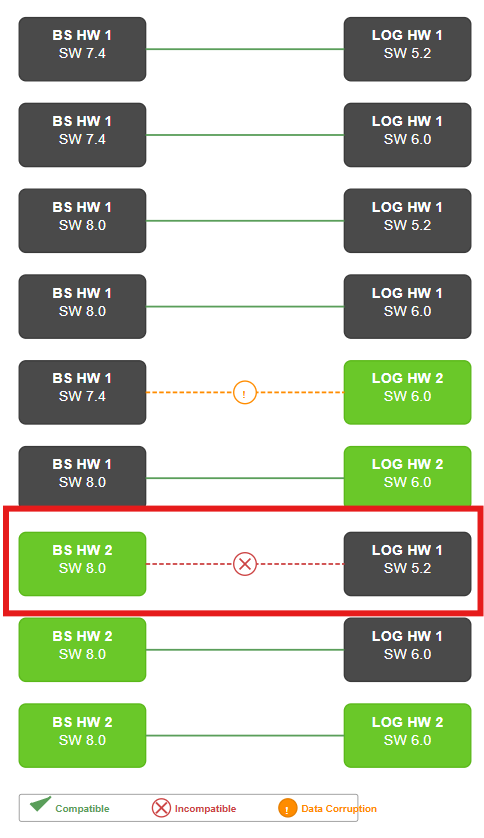
A specific compatibility limitation exists where legacy HW1 loggers operating on Software Version 5.2 are unable to communicate with HW2 Base Stations operating on Software Version 8.0.
This situation prevents the logger from receiving software updates via the normal cloud distribution mechanism.
Affected Configuration
The following configuration is affected:
Base Station
Logger
Result
HW2 / SW8.0
HW1 / SW5.2
No Communication
Figure 1 – Base Station / Logger Compatibility Matrix
Technical Explanation
The standard software update process operates as follows:
SCADAR Cloud
▼
Base Station
▼
Logger
Where a logger is operating as:
Logger Hardware Version 1
Logger Software Version 5.2
and the site Base Station is operating as:
Base Station Hardware Version 2
Base Station Software Version 8.0
communication cannot be established.
As communication is not possible, the logger cannot receive the software update required to migrate to Version 6.0 using the normal update path.
Resolution Procedure
The approved migration path requires temporary use of a compatible HW1 Base Station.
Upgrade Process
1. Identify the affected logger.
2. Confirm the logger is:
o HW1
o Software Version 5.2
3. Confirm the site Base Station is:
o HW2
o Software Version 8.0
4. Temporarily connect the logger to a compatible HW1 Base Station.
5. Upgrade the logger to Software Version 6.0 or later.
6. Return the logger to service with the HW2 Base Station.
7. Verify successful communication.
Following upgrade to Version 6.0, normal operation is restored.
Identification of HW1 and HW2 Devices
Hardware generation can be determined using product serial numbers.
Each OEM has a defined serial number transition point at which HW2 hardware was introduced.
Figure 2 – HW2 Introduction Serial Number Breakpoints
BSSN01000635
GP.4-20.mA.SN01000115
DS.-80.CEL.SN01000062
FS.220.mm.SN01000162
TS.200.CEL.SN01000121
PS.16.Bar.SN01000963
CS.800.A.SN01002082
PS.60.Bar.SN01000018
CS.50.A.SN01000086
The product family designation (CS, PS, TS, FS, DS, GP, etc.) identifies the logger type, while the serial number indicates whether the unit was manufactured before or after the HW2 hardware transition.